
Once a post is approved, MX publishes it to each location’s Google Business Profile separately. Each location gets its own result, so one location can fail while the others publish.
Find a post
Posts lists every post, newest first, with its status, the number of locations, the schedule, an outcome summary such as “3 of 5 published - 1 failed”, and who created it. Filter by a location or group, or by status:
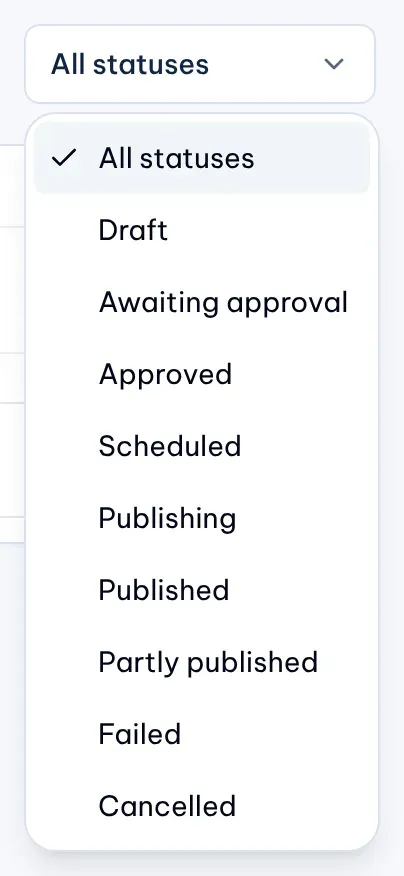
- Publishing: MX is sending the post to its locations.
- Published: every location has it.
- Partly published: some locations have it and some failed.
- Failed: no location has it.
Each location page also lists its three latest posts under Recent posts, with a link to all of them.
Follow each location
-
Open the post from Posts. Outcome by location lists every location with its status, the number of attempts, the outcome and when it published.
-
Use the filters above the list to narrow it: All, Published, Failed, On hold, In progress and Skipped, each with its count.
-
On a published location, select View on Google to open the post on Google. The link appears only when Google returns one.

1: Failed filter. 2: View on Google. 3: Retry failed locationsIllustrative data
A location’s status is one of these:
- Pending or Publishing: waiting for its turn, or being sent. Google sometimes takes a while to confirm a post; the outcome then reads Google is still processing the post.
- On hold: MX is waiting before it sends, and the outcome says why, for example Reconnect Google in Settings or Automations are paused. The location continues once the cause is fixed.
- Published: Google has the post.
- Failed: the outcome says why, for example Google rejected the post or The connected Google account cannot post for this location.
- Skipped: MX stopped before sending to this location.
Retry failed locations
- Open a post that is Failed or Partly published.
- Select Retry failed locations, then Confirm retry.
A retry sends the post again to the locations that can be retried, using the same approved content, with no new approval. Retries used shows how many of the three retries are spent. Owners, Admins and Editors can retry.
Some failures are never retried, because sending again could post twice or fail the same way: Google rejected the post, Google may already have it, or the media can no longer be used. If no failed location can be retried, a line under Outcome by location says why. After three retries, write a new post to try again.