
GuideTouchpoints
Touchpoints - QR codes that collect ratings and private feedback per location
Hear from customers while they are still at your location: a QR code per location collects ratings, Google review clicks and private feedback
Table of contents
The problem
Most customers leave without saying anything. The happy ones rarely think to write a review, and the unhappy ones often say nothing at all. An owner or manager finds out about a problem at one branch when it is already a one-star review, and has no easy way to hear from customers while they are still at the counter.
Doing it by hand
Paper comment cards, a single QR code to the Google profile or a feedback form built in a separate tool each solve part of it. Google lets you create a link or QR code to request reviews, but it leads to the review form only: it does not collect private feedback or show which spot in a branch a scan came from. Someone still has to print and replace codes for every location, collect the answers, work out which branch they came from and pass them on. Results end up in different places, and nobody can compare locations.
What changes with Touchpoints
Touchpoints gives each location its own QR codes that open a short, branded feedback page. A customer scans one at the counter or the table, rates the visit and chooses what to do next: leave a Google review, contact the location or send private feedback directly to your business. MX records the scans, ratings, clicks and feedback and shows them by location.
What you get
- Feedback from the moment of the visit. Customers rate and comment while the experience is fresh.
- A direct line to your business. Any customer can send feedback directly to your business, and every customer sees the same choices, including the Google review link.
- Results per location. Scans, ratings and feedback are counted for each location, so you can see where the experience works and where it does not.
How it works in MX
Open Touchpoints in the sidebar. It has four pages: Overview, Feedback Inbox, QR codes and Experience.
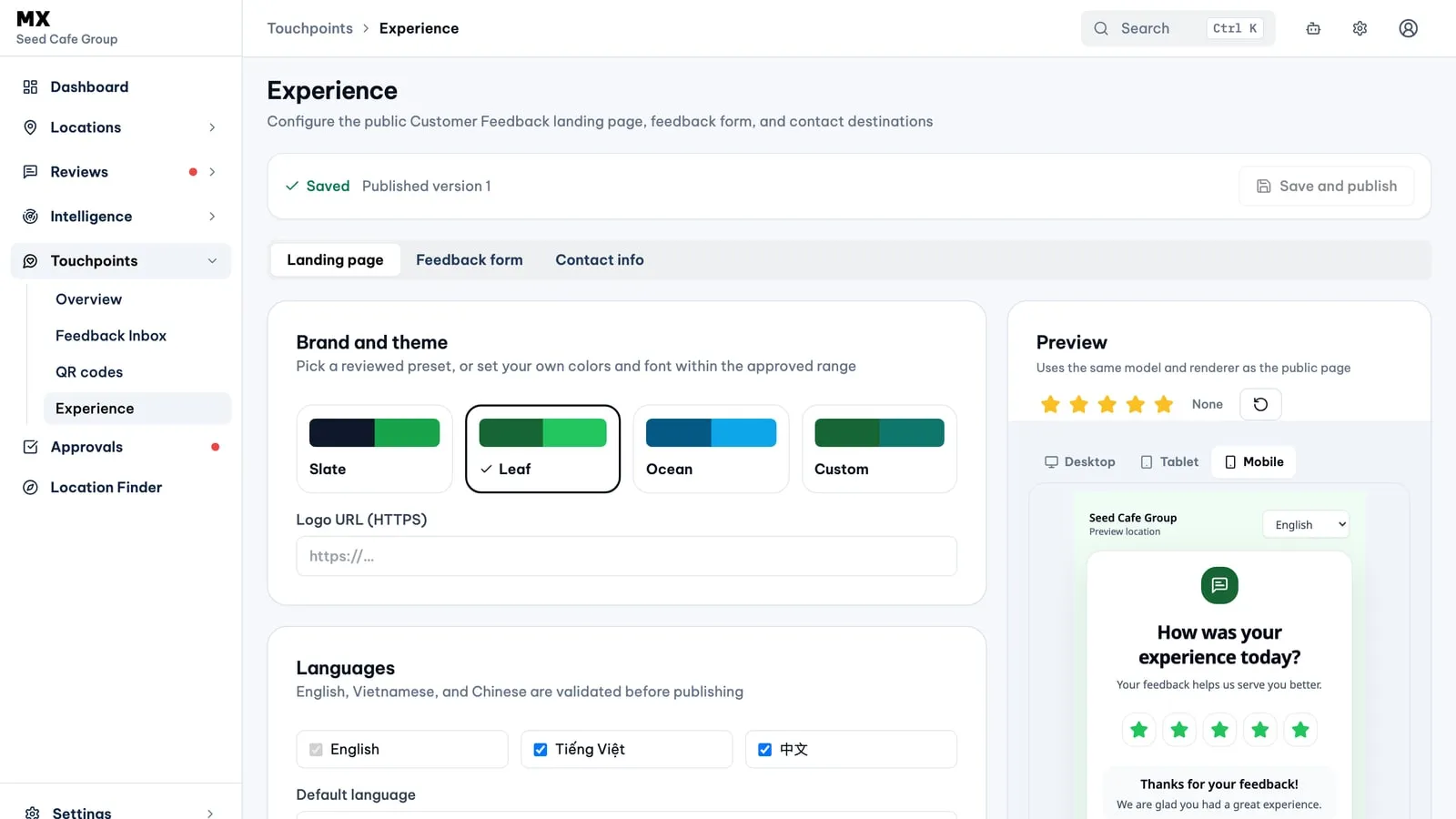
- Design the page. The Experience editor has three tabs: Landing page, Feedback form and Contact info. Pick the Slate, Leaf or Ocean theme, or Custom to set your own colours, font and corner style, add a logo, and write every heading and message in English, Vietnamese and Chinese, for the languages you turn on. The Preview shows the page as customers will see it, on desktop, tablet or mobile. Save and publish creates a new numbered version. Set up the feedback page customers see walks through each tab.
- Choose the actions. Up to five, in your order: Google review, Phone, Zalo, WhatsApp and Private feedback. Private feedback is always on, so customers can always send feedback directly to your business. Phone, Zalo and WhatsApp use company contact details, which you can override for each location.
- Build the feedback form. Up to ten questions: short text, long text, single choice, multiple choice and rating. Name, email and phone fields are optional and off until you turn them on; a customer who leaves contact details first agrees that they can be used to answer their feedback.
- Create and download QR codes. Each QR code belongs to one location and one spot in it, such as the counter or table 12. Create codes for up to 50 locations at a time, style them with six presets and an optional centre icon, and download PNG or SVG files, up to 25 at once. A code can be turned off, turned back on or archived. The QR codes guide covers each step.
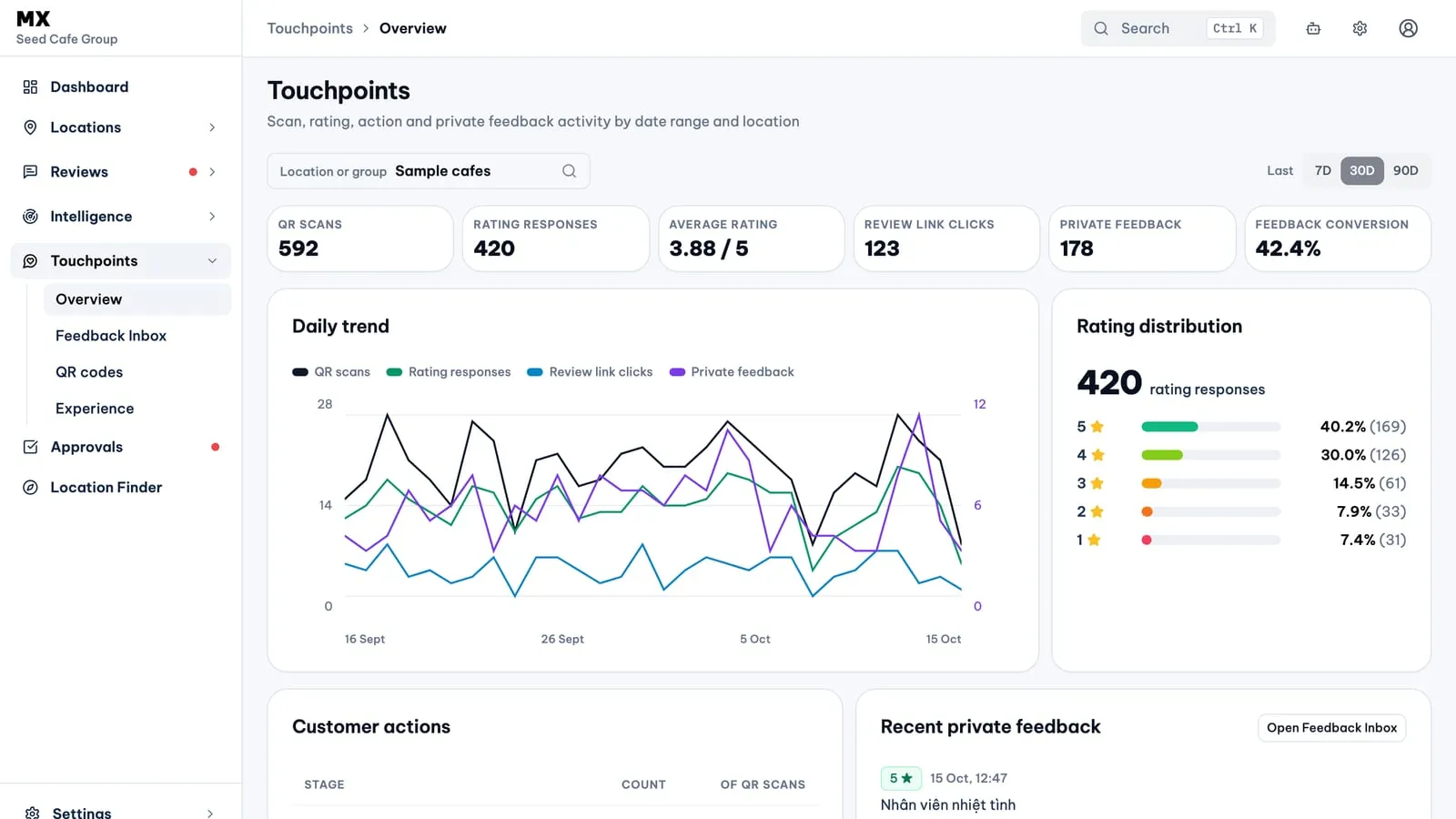
- Read the results. Overview shows QR scans, rating responses, average rating, review link clicks, private feedback with the share marked resolved, and feedback conversion, with a daily trend, rating distribution and location highlights. Pick 7 days, 30 days, last month or 90 days, and longer periods on Pro and Business. The Feedback Inbox lists private feedback with search and filters; mark items read, archive them, or mark them Resolved once someone has answered the customer. See the Feedback Inbox guide.
Customers see the same actions in the same order, whatever their rating, and the Google review action is never hidden or held back. That matches Google’s policy on reviews, which does not allow businesses to discourage negative reviews or ask only happy customers for positive ones.
Who can use it
Touchpoints is on every plan, for owners and admins. Other roles do not see it.
Current limits
- Touchpoints works with locations connected through Google Business Profile.
- Archiving a QR code is permanent. Codes cannot be renamed or moved to another location.
- MX does not send replies to customers. You contact them with the details they chose to leave, then mark the feedback Resolved.
- The Feedback Inbox has no conversations, assignment or ticketing, and no email notifications for new feedback.
- There are no PDF or print templates for QR codes.
Further reading
- Knowledge baseSet up the feedback page customers see
- Knowledge baseCreate and print QR codes
- Knowledge baseRead and resolve private feedback
- Knowledge baseRead the Touchpoints Overview