
ArticlePlatform
Local search and AI - what Google's AI features mean for your locations
What Google's AI features in Search and Maps mean for a multi-location business, and the parts of each location's listing your team controls
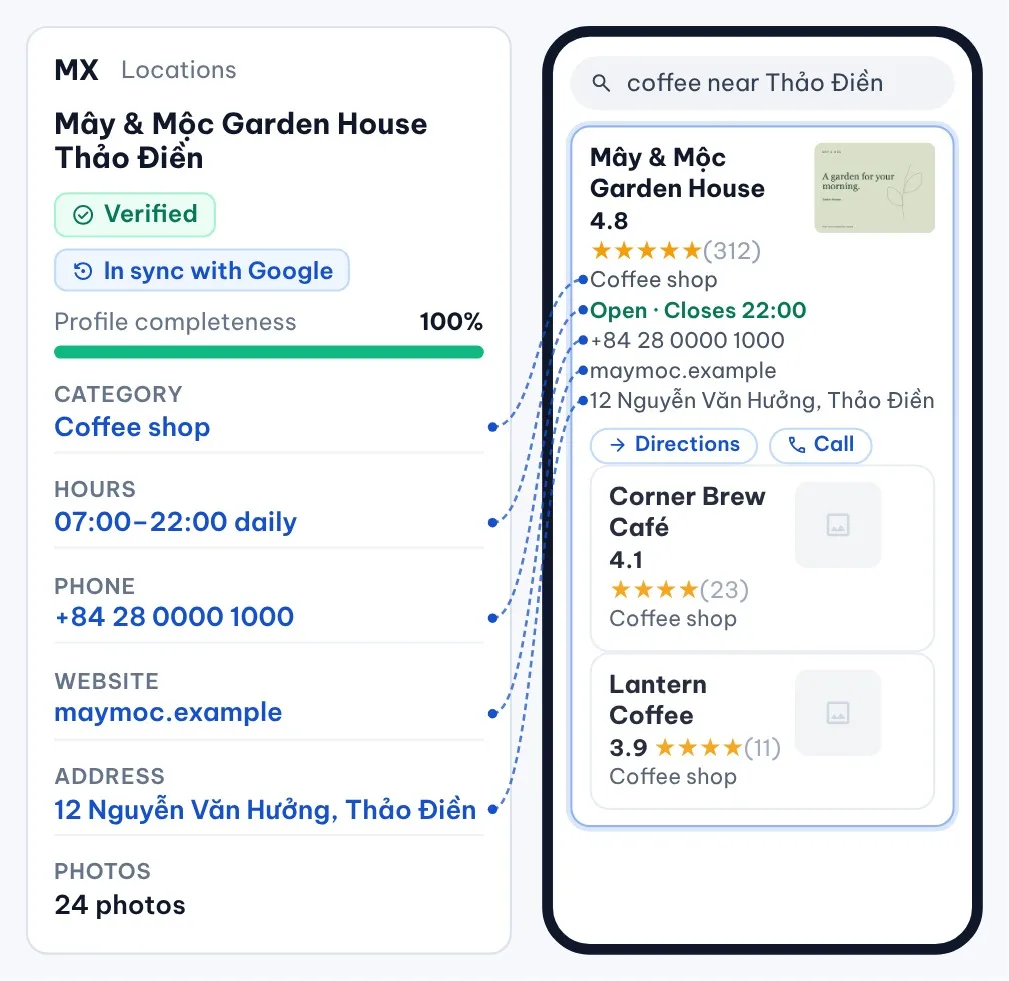
A customer looking for a café, a clinic or a bank branch used to scroll a list of places. More and more, Google answers the question for them, with an AI summary in Search or a conversation in Maps that names a few places. For a business with fifty or five hundred locations, that raises a fair question: what decides which branches show up, and what can the team actually do about it?
The honest answer has two parts. Google decides how its AI features work and which places they mention. What you control is the information those features read about each location.
What Google has announced
Three features matter most for local businesses. Each description below comes from Google’s own pages.
- AI Overviews and AI Mode in Search. Google’s Search Central page, AI features and your website (last updated 10 December 2025), describes AI Overviews as a way to “get to the gist of a complicated topic or question more quickly”, and AI Mode as most helpful where “further exploration, reasoning, or complex comparisons are needed”.
- Review summaries in Maps. On 31 October 2024 Google announced Gemini in Google Maps, including review summaries that tell people what others like about a place, and the option to ask questions about a place. The features started rolling out in the U.S. on Android and iOS, with similar experiences planned for Search.
- Ask Maps. On 12 March 2026 Google introduced Ask Maps, which “answers your real-world questions with a conversation” and returns a customized map. Google says it analyzes information from over 300 million places and reviews from more than 500 million contributors. It rolled out first in the U.S. and India on Android and iOS.
Ask Maps is Google’s product. MapLovin does not control it or how it chooses places. The same goes for AI Overviews, AI Mode and review summaries: Google decides where they appear, when they reach each country and which places they name.
What Google says businesses should do
Google’s guidance here is short, and it does not ask for anything new. The Search Central page says there are “no additional requirements to appear in AI Overviews or AI Mode, nor other special optimizations necessary”, and that “all existing SEO fundamentals continue to be worthwhile”. One of its listed practices is “checking that your Merchant Center and Business Profile information is up-to-date”.
For local results, Google Business Profile Help, in Tips to improve your local ranking on Google, names three factors: relevance, distance and prominence. Its tips are to make your business information “as complete as possible”, including your hours and special store hours, to verify each location, to reply to reviews and to add photos and videos. The same page states plainly: “There’s no way to request or pay for a better local ranking on Google.”
So there is no AI shortcut, and nobody can promise a place in an AI answer. Complete, accurate profiles, answered reviews and current content help provide the signals Google’s search and AI experiences may use.
What a multi-location team controls
Accurate basics at every location. Name, address, phone, website, description and hours are the facts a customer acts on. In a chain, they drift: a branch changes its number, a manager edits hours directly on Google, a new location goes live without a description. One wrong phone number is a lost call; fifty are a pattern.
Hours that match reality on special days. Holiday and special hours are set per date in Google Business Profile. Google’s own tips mention special store hours alongside regular hours.
Fresh posts and photos. Posts and photos show customers what each location offers now. A profile that has not changed in months tells them little.
Reviews and replies. Reviews are what people read before they choose, and Google’s tips include replying to them. Every reply is public, so the tone and the facts need to be right at every location.
Where MX helps
MX keeps these basics in one place for every location.
- Profile details. The location editor compares the values in MX with Google and marks each field live, pending, conflict or Google-updated. Every change goes through Approvals before MX writes it to Google; Google may still review a change before it shows. On Business, Bulk Update changes the phone, website, description or weekly hours across a group or the whole chain in one request.
- Health Check. The Dashboard counts how many locations have no profile issues, such as a missing phone, website, description, hours, Place ID or cover photo, or a difference between MX and Google, and links each issue to its fix. It also lists locations with no post from MX in 30 days and locations with no recent owner photo found in synced Google media.
- Posts. Write a post once and publish it to every chosen location or a whole group on Google Business Profile, after approval. On Pro and Business, Content Plan schedules posts for the weeks ahead.
- Reviews. Reviews from every location arrive in one inbox, with AI reply drafts written to your AI Reply settings, and replies approved and published to Google from MX.
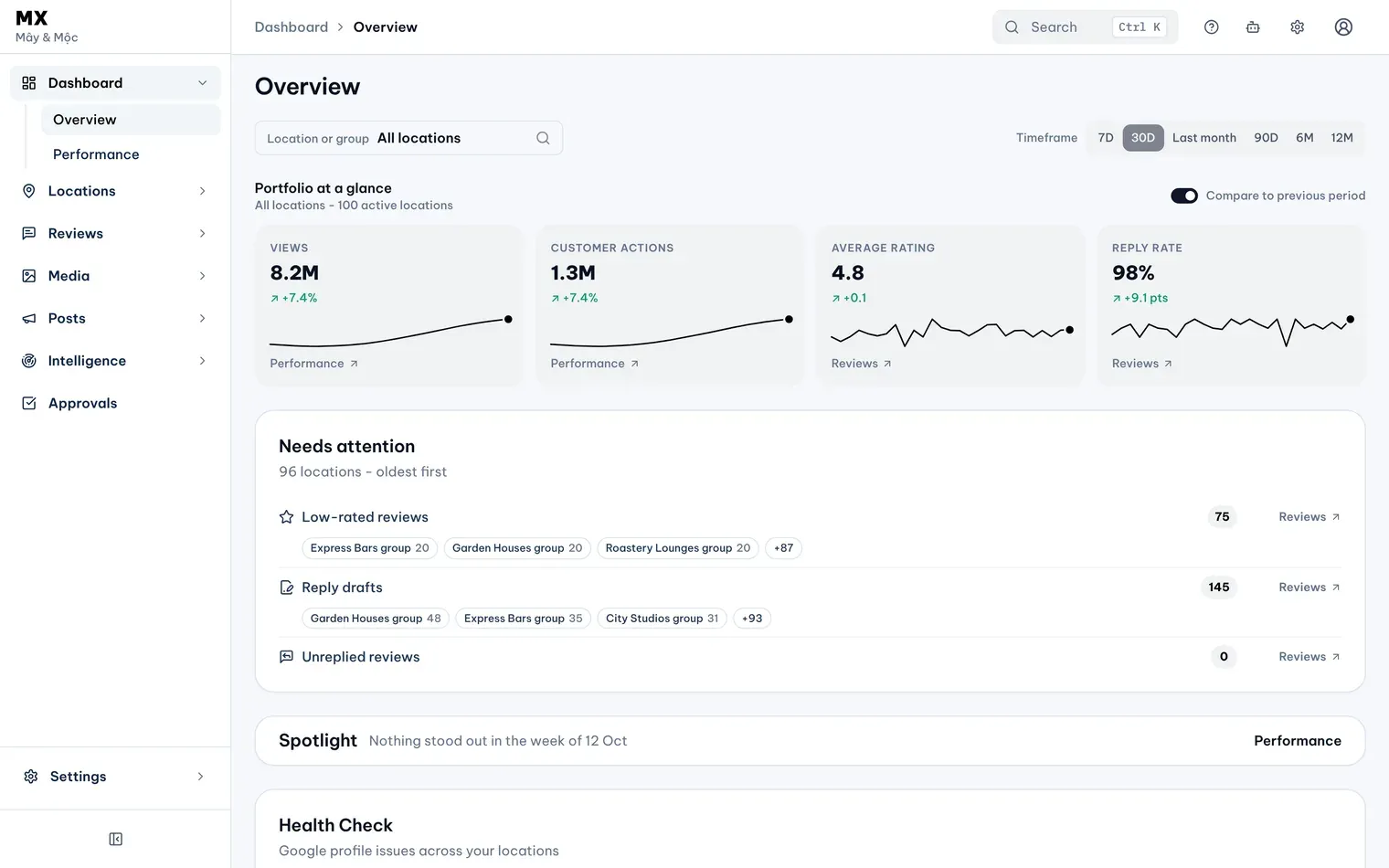
Edit a location’s details and Read the Dashboard Overview walk through both pages. For reviews, see Build trust; for posts and analytics, Grow with AI.
Current limits
- MX does not control Google’s AI features or how they rank or choose places, and makes no claim that any change in MX gets a location into an AI answer
- MX does not edit special or holiday hours, categories or attributes; set those in Google Business Profile
- Posts publish to Google Business Profile only, and a published post cannot be edited or deleted from MX
- Bulk Update is on Business; Content Plan is on Pro and Business
Further reading
- Knowledge baseEdit a location's details
- Knowledge baseRead the Dashboard Overview
- Knowledge baseCreate a post for your locations
- Knowledge baseWrite a reply with or without AI
- BlogGrow with AI - see what drives results and act on it
- BlogBuild trust - invite every customer to speak and answer every review