
GuideReviews
Review Inbox - one list for every location's Google reviews
Stop opening each Google profile to find unanswered reviews: one list shows what needs a reply, helps you draft it and sends it for approval
Table of contents
The problem
When a business has more than a handful of locations, its Google reviews are spread across as many Business Profiles. Nobody sees all of them at once, so nobody can say which reviews are still waiting for a reply. A complaint left at one branch on Saturday can sit unanswered for days because the person who looks after that profile was busy elsewhere.
Doing it by hand
Without one list, someone has to open each profile in turn, scroll through the newest reviews, remember which ones already have a reply and write each answer from scratch. When replies need a manager’s sign-off, drafts travel by chat or email and the final text is pasted back into Google by hand. The work grows with every location you add, and the quality of the replies depends on who happened to write them.
What changes with the Review Inbox
The Review Inbox brings the Google reviews of every location you have added to MX into one list, sorted by what still needs doing. You see unanswered reviews first, read each one with its rating and location, prepare a reply with or without AI, and send it to Approvals without leaving the page.
What you get
- Nothing slips through. Status tabs show how many reviews need a reply, which have a draft and which are waiting for approval.
- Consistent replies. AI drafts follow one set of company settings for language, tone, length and signature.
- Control before anything goes out. Submitted replies wait in Approvals, so a manager sees them before they reach Google, unless an owner or admin turns on automatic approval.
How it works in MX
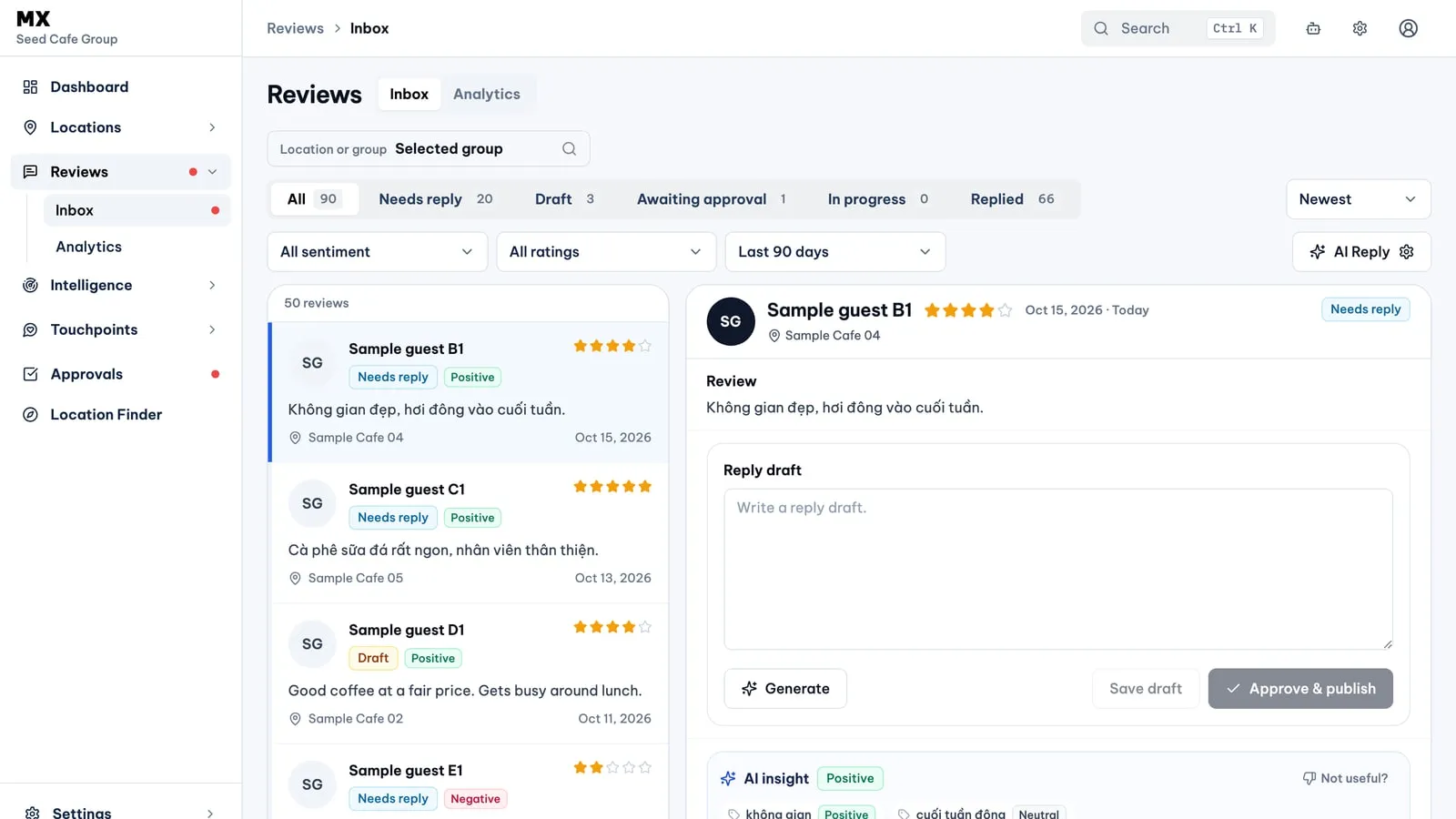
Open Reviews → Inbox in the sidebar. The list sits on the left and the selected review on the right; on smaller screens the two panes stack.
- Work by status. Tabs with live counts split the list into All, Needs reply, Draft, Awaiting approval, In progress and Replied. A reply already posted on Google shows as Replied, whether it was written in MX or not.
- Narrow the list. Pick one location or one location group, then filter by sentiment (positive, neutral or negative), by low rating (1 to 3 stars) and by date: the last 7, 30 or 90 days, or last month. Sort newest or oldest first. Filters live in the page address, so you can bookmark or share a filtered list.
- Read the review in context. The detail shows the reviewer, stars, location, date, the full text and any photos. An AI insight card lists the topics and 7Ps experience areas the review mentions, with a suggested angle for the reply.
- Draft a reply. Write it yourself or choose Generate for an AI draft, then edit and save it. AI Reply settings set the reply languages, a warm or professional tone, short or long replies, and the name and signature to sign with.
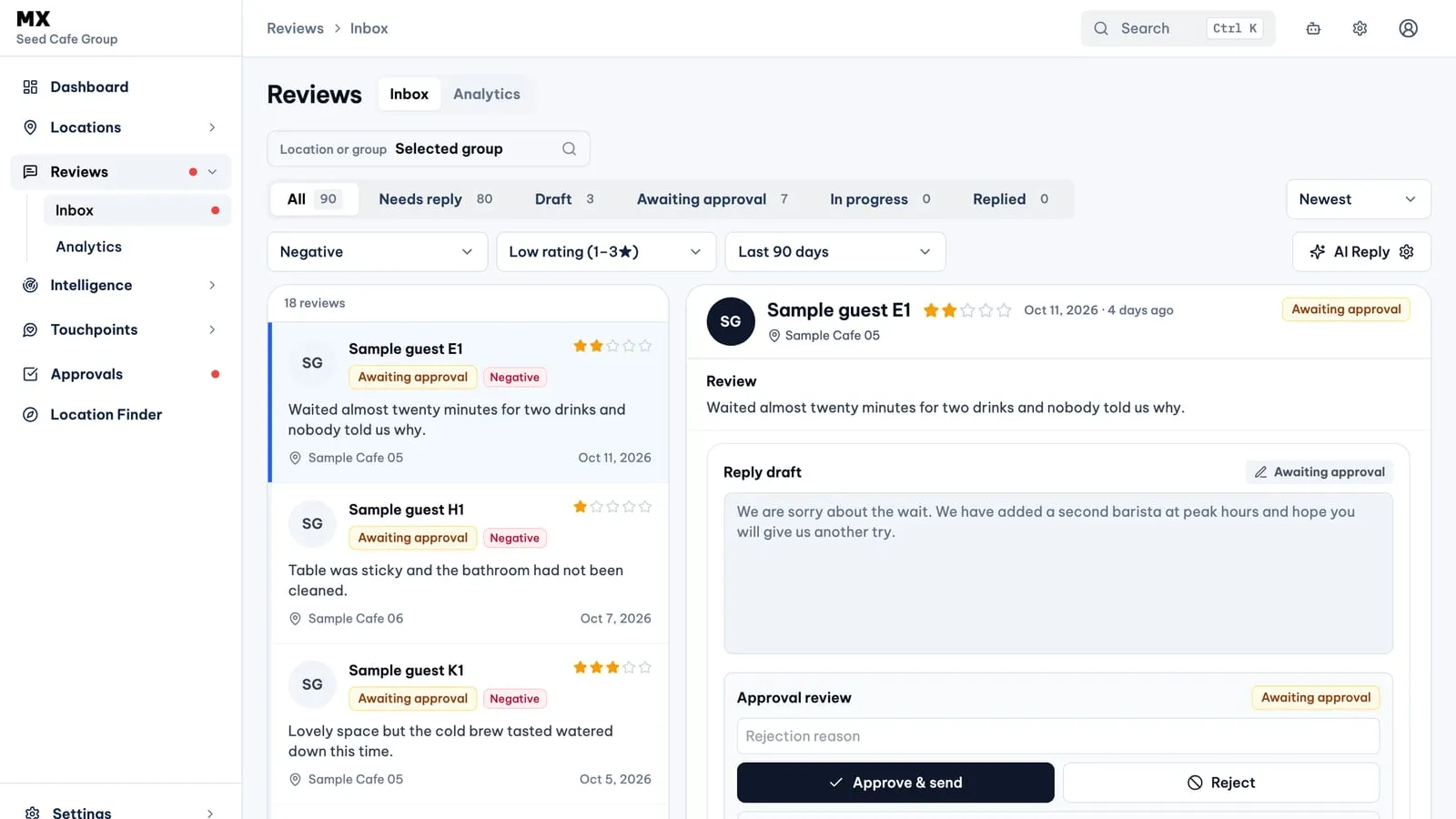
- Send it for approval. Submit the draft and it waits in Approvals until someone with approval rights accepts or rejects it. An owner can choose Approve & publish to do both steps at once. Approved replies move to In progress while MX hands them to Google, and to Replied once the reply is on the profile.
Who can use it
Every member of the company can open the Review Inbox and read reviews. Only owners write, generate and submit replies. Owners, admins and approvers approve or reject a reply; owners and admins can also edit a reply that is waiting for approval. Everyone else sees the reply area as read-only. AI drafts and reply sends count towards any monthly allowance on your plan.
Current limits
- Reviews come from Google Business Profile only. A new connection brings in about the last three months of reviews.
- The list covers the last 90 days at most and loads 50 reviews at a time.
- A reply can be up to 4,000 characters.
- Automatic AI drafting and automatic approval stay off until an owner or admin turns them on in Automations.
- There is no free-text search, saved view or bulk reply.
- A reply that is already on Google cannot be edited or deleted from MX.