GuideReviews
AI review reply - draft Google review replies in your tone and languages
How AI Reply in MX drafts review replies, what each AI Reply setting changes, and how every draft still goes through your approval
Table of contents
A business with several locations gets new Google reviews every day, in English, in Vietnamese and sometimes in other languages. Writing each reply by hand takes time, so reviews wait, and replies written by different people at different locations read differently. Replying in two languages often means writing the reply twice.
AI Reply writes the first draft for you. You choose the languages, the tone and the length once, and each draft follows them. You still read, edit and approve every reply before it goes to Google. Reviews get answered sooner, in one consistent voice across your locations, and you spend your time on the reviews that need real attention.
How it works in MX
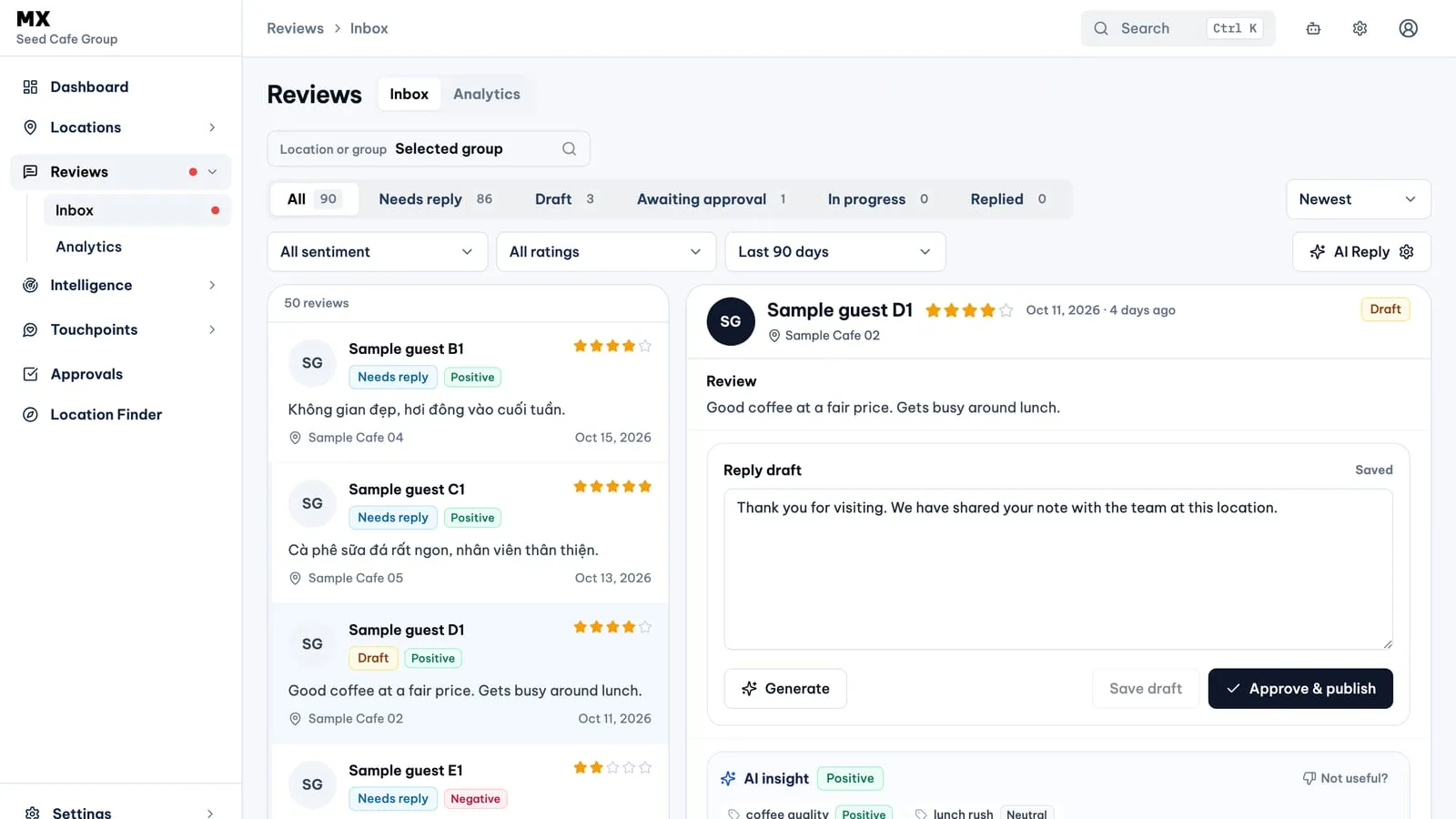
- Open Reviews → Inbox and select a review marked Needs reply or Draft.
- Choose Generate. MX writes a draft that follows your AI Reply settings and saves it in the reply box, replacing what was there.
- Edit the draft if you need to and choose Save draft.
- Choose Submit for approval, or Approve & publish if you can approve replies yourself. Nothing is sent to Google before that step.
For the rest of the reply flow (status tabs, filters and approval), see the Review Inbox guide.
The AI Reply settings
Choose AI Reply above the review list to open the settings.
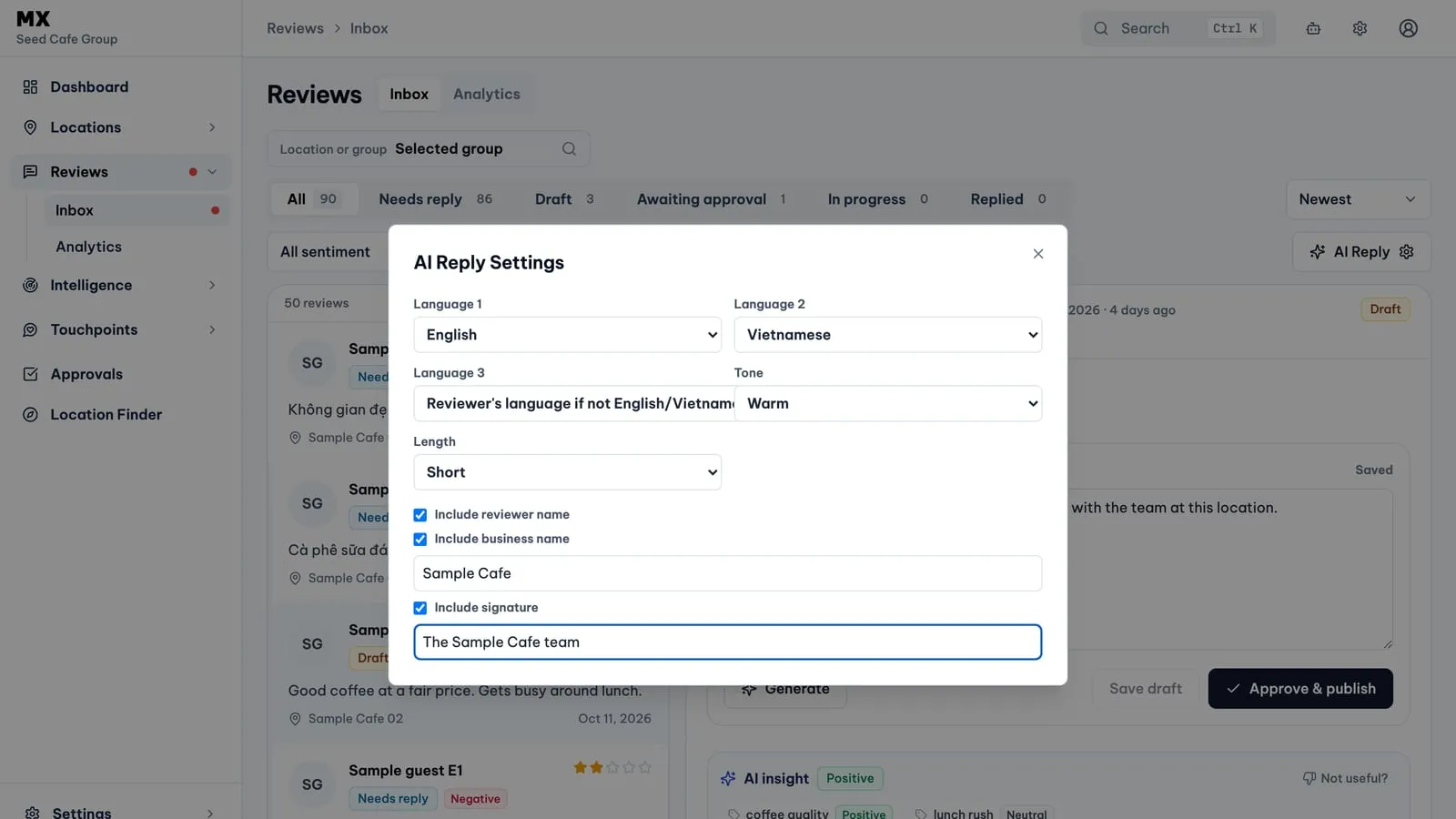
- Language 1 and Language 2. English, Vietnamese or None. By default the reply starts in English and adds a Vietnamese section. Each section is written for its language rather than translated word for word, and the sections are separated by a line with three dashes.
- Language 3. “Reviewer’s language if not English/Vietnamese” (the default) or None. With the default, a review written in another language also gets a section in that language.
- Tone. Warm (the default) or Professional.
- Length. Short (the default) or Long.
- Include reviewer name. On by default, so the reply greets the reviewer by name.
- Include business name. Off by default. When you turn it on, type the name to use; if you leave the field empty, MX uses your company name.
- Include signature. Off by default. When you turn it on, type a sign-off such as “The Sample Cafe team”; it goes on its own line at the end of the reply.
Your settings belong to you, not to the whole company. MX remembers them in your browser and saves them to your account each time you generate a draft, so a colleague can keep different settings.
What the drafts avoid
MX gives the AI a fixed set of rules for every draft:
- no links, discounts, incentives or promises;
- a short thank-you for a 4 or 5 star rating with no text, and a brief apology without promises for a 1 to 3 star rating with no text;
- when the stars and the text disagree, the reply follows the text;
- careful wording, or no attempt to answer, for serious complaints about safety, legal or medical issues, or discrimination.
These rules make a good starting point, not a finished reply. Read every draft before you submit it, especially for negative reviews.
Who can use it
Only the company owner can generate drafts and sees the AI Reply button. Owners, admins and approvers can approve a submitted reply. Each draft counts towards any monthly AI draft allowance on your plan.
Automatic drafts
If Draft replies is turned on in Settings → Automations, MX also drafts replies for new reviews without anyone choosing Generate. Automatic drafts use MX’s standard settings, not yours: a warm, short reply that uses the reviewer’s name, with no business name or signature. Owners and admins manage Automations, and it is not available on every plan.
Current limits
- Replies can be written in English and Vietnamese, plus a section in the reviewer’s language when the review is in another language.
- There are two tones and two lengths. You cannot add your own instructions or example replies.
- Settings are per person. There is no shared company reply style.
- Automatic drafts do not use your AI Reply settings.
- Generate works on reviews that need a reply or have a draft. It cannot rewrite a reply that is already on Google.
- A reply can be up to 4,000 characters.